
Description
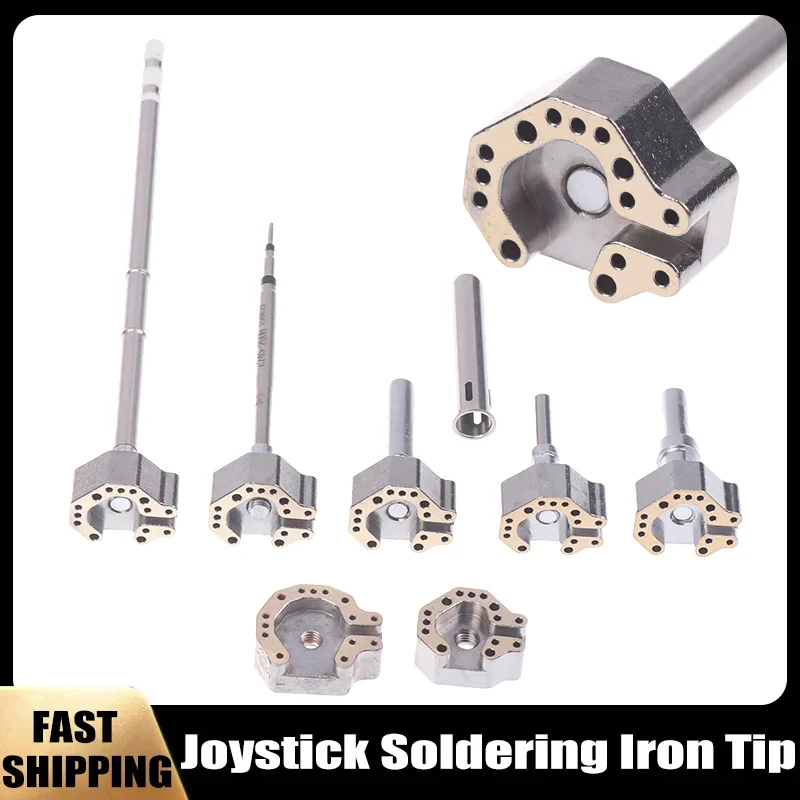
Upgrade your console repair kit with the 1‑set Joystick Soldering Iron Tip Heating Mold – the perfect accessory for disassembling and fixing PS4, PS5, Nintendo Switch, and Pro Controller joysticks. Designed for both hobbyists and professional technicians, this precision tool delivers consistent heat, reduces soldering time, and protects delicate components, ensuring a flawless repair every time.
Key Highlights
- ✅ Universal Compatibility: Works seamlessly with PS4, PS5, Nintendo Switch, and Switch Pro controller joysticks.
- ✅ Precision‑Engineered Tip: Heat‑conductive alloy provides rapid, even heating for clean solder joints.
- ✅ Durable Construction: High‑temperature resistant silicone and stainless‑steel core extend tool life.
- ✅ Easy Installation: Fits standard soldering irons; simply attach and start repairing.
- ✅ Safety First: Integrated heat‑shield design minimizes accidental burns and protects surrounding parts.
- ✅ Compact & Portable: Lightweight design fits in any tool bag for on‑the‑go repairs.
Why Choose This Soldering Iron Tip?
When it comes to console joystick repair, precision and reliability are non‑negotiable. This heating mold delivers a stable temperature range (200‑450 °C) that melts solder quickly without overheating plastic housings. The ergonomic shape allows you to reach tight corners, making it ideal for:
- Replacing worn joystick modules
- Re‑soldering broken solder joints
- Cleaning and re‑flowing connector pins
- Performing routine maintenance to extend controller lifespan
Product Specifications
- Material: High‑grade silicone + stainless‑steel tip
- Compatible Controllers: PS4, PS5, Nintendo Switch, Switch Pro
- Operating Temperature: 200 °C – 450 °C
- Tip Size: 2.5 mm diameter, 10 mm length
- Package Includes: 1 × Joystick Soldering Iron Tip Heating Mold
How to Use
1. Attach the heating mold to your soldering iron’s standard 1/4‑inch chuck.
2. Set the temperature to the recommended range (250‑350 °C for most joystick repairs).
3. Apply the tip to the solder joint, allowing the heat to melt the solder evenly.
4. Replace or adjust the joystick component, then let the joint cool naturally.
5. Remove the tip and store safely after the iron cools down.
Customer Satisfaction Guarantee
We stand behind the quality of our repair tools. If you encounter any issues, contact our support team within 30 days for a full replacement or refund. Enjoy hassle‑free repairs and keep your gaming experience at its peak.



Reviews
There are no reviews yet.